For the club office, club management and pro shop
Your lost-property box, set up properly
This page has everything your team needs to know: how to log a club someone found, what happens next, where the QR codes should go, and the questions that usually come up. You can print it and keep it in the office.
At a glance
Your lost-property cupboard, online. Every find sits in your list with a photo and is easy to look up when someone asks at the desk. You also see who handed out which club and when. Free and without a login, on the tablet too. And if the owner gets in touch with us, you hear about it by email.
- 1Register your club. Once, free of charge and with no contract. You then get your personal reporting link by email.
- 2Log a find. Open the link, pick the type of club, send. Golf club, date found and storage place are already filled in.
- 3Check the owner. When a loss report fits, you get an email. The golfer describes their club, and you decide whether the description is right.
- 4Hand it back. Arrange the pickup, ask for ID, click “Done”.
People who lose a club report it themselves on our website. Your office only logs the finds. We take care of the matching, the notifications and the contact with the owner.
Registering your club
You register on the partner page. We need three things: your name, the name of the golf club and an email address. Website and message are optional.
Ideally, register with the club office address, one on your club's own domain. If it matches the club in our directory, your club goes live straight away. With a personal address (Gmail, Outlook and the like) we check the registration by hand first. You get a short email saying we are checking, and the welcome email once it is approved.
The welcome email contains your personal reporting link, the address of your club page and the way to the print material. Please keep it.
Logging a find
Open your reporting link: from the welcome email, from a bookmark or through the club portal. Your club's name is already fixed in the form.
Only two fields are required
- What was found? The type of club, such as driver, iron, wedge or putter.
- Date found. It is preset to today. For an older club from the box, tick “Date unknown”.
What makes the search easier
- Photos: up to three, taken straight from the phone camera. The form uses the photo to fill in type and brand if those fields are still empty. Have a quick look whether it got them right.
- Under “More details (optional)”: hole, brand and model, storage place, description, serial number and your first name. All optional.
- Serial number: usually on the shaft or the club head. If the owner gives the same number, it counts as a match straight away.
The whole box in one go
For older finds there is the option “Enter several clubs in a row”. Date and storage place then stay filled in from one report to the next, and you only pick the type and take the photo.
Several people on the team
Open the reporting link on every device your team uses: the front-desk PC, the tablet, the office phone. The device then remembers your club for a year, and /club-portal takes you straight in without an email. On a phone it is worth adding the page to the home screen. With “Get Match Alerts on This Device” the device alerts you when an owner turns up.
Lost the link? Enter the club address in the club portal and it comes again by email.
What happens after you log a find
The matching
Every found report is compared with all loss reports: brand, type of club, course, date and the descriptions on both sides. This works across course and country borders, and open reports are compared again every morning. A loss reported next week will still find your club.
For each open find, the portal also shows up to three loss reports that might fit. If you are sure one of them is right, click “Could be a match — notify the golfer”. The golfer is notified and still has to describe their club.
Proof of ownership
When two reports fit, both sides get an email. The golfer then has to describe how they recognise their club, with at most three attempts. As soon as the description is in, you get a second email with the button “Check the proof”.
You read the description and compare it with the club in your hand. If it fits, confirm. If not, decline, and the golfer can try again. If a proof sits unchecked, we remind you after two days.
Getting in touch
Once you confirm, a chat opens. Both sides write through us, and neither sees the other's email address. That is where you arrange the pickup.
The handover
Please ask for ID at pickup. When you close the case, you can tick “ID seen at pickup”. Only the tick is stored, no name and no ID number.
Then click “Done”. Both sides get a closing email, and the find leaves your open list.
QR codes and notices: what goes where
Two kinds of links. Please don't mix them up.
Your personal reporting link is the key to your club area. Anyone who has it can log finds for your club and see your cases. It belongs in the office and never on a notice board. If it has been made public by mistake, write to us. You get a new one, and the old one stops working.
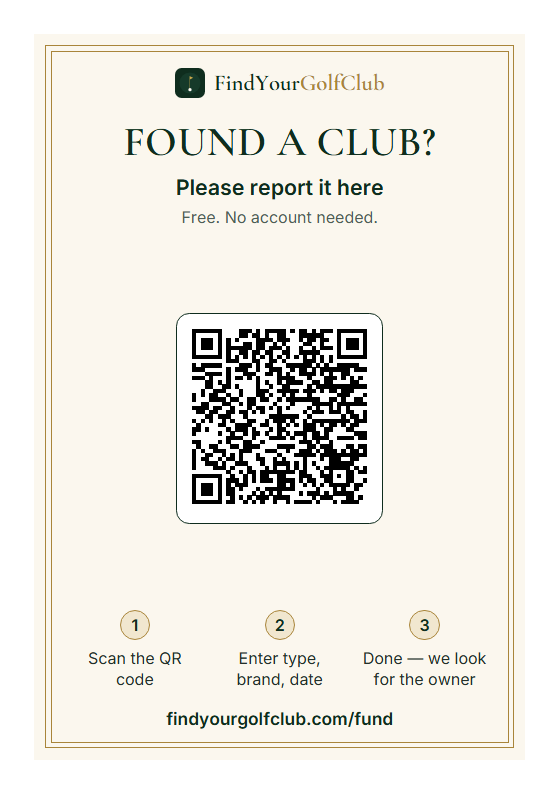
The QR codes on notices lead to the public report form. With the club link, the report goes straight to your club, but nobody gains access to your cases.
The material is in your club portal under “Material”, as print-ready PDFs in many languages, including English, German, French, Spanish, Portuguese and Dutch.


Where each code works best
| Place | What goes there | Who sees it |
|---|---|---|
| Lost-property box | Sticker with club link | Whoever hands in a club can report it themselves. |
| Behind the desk | Office instructions | Your team, including cover and temps. |
| Notice board, clubhouse entrance | Poster with both codes | Members who are missing something. |
| Caddie shed, bag room, starter's hut | Flyer with club link | Greenkeepers, starters and players who find something. |
| Pro shop, desk, halfway house | Postcards to take away | Visitors who only notice at home that something is missing. |
| Club website | Link to your club page, plus the club pin | People searching usually land on your website first. |
| Newsletter, club magazine, social media | Images from the media kit | All members, good at the start of the season. |
Making sure the code scans
- Print at actual size, 100 %, not “fit to page”.
- Test it once with your own phone after putting it up.
- At eye level and in good light. Behind reflective glass some codes scan badly.
- If the box is outdoors or in the caddie shed, laminate the sticker or have it printed weatherproof.
A routine for your team
It works best when everyone on the team does the same thing. A suggestion you can adapt to your club:
- 1A club comes in: log it the same day, with a photo from the phone.
- 2Tag it: date found and your initials on a strip of masking tape on the shaft, or a note stuck on with sticky tape. Anyone can find it again later.
- 3Into the box or wherever you said in the form.
- 4Email “Check the proof”: compare the description with the club, confirm or decline.
- 5Pickup: ask for ID, tick the box, click “Done”.
- 6Once a month: compare the open list in the portal with the box. Mark anything no longer there as returned.
Small habits that pay off
- Three photos, three angles: the whole club, the head with brand and model, and whatever makes it special, such as the grip, an engraving or a sticker.
- Keep the headcover with it: if the club came in with a headcover, put both together with a rubber band. The headcover is often how the owner recognises it.
- Sort by date: new finds at the back of the box, the oldest at the front. That makes the monthly check quick.
- A “reserved” spot: once a proof is confirmed, put the club in a separate place with a note saying “reserved” and the date. Then nobody hands it to someone else by mistake.
- Short way from the course: ask greenkeepers, starters and the caddie master to bring found clubs straight to the office. A club that sits in the shed for a week loses a week.
- Brief your cover staff: show the temp the reporting link on the device once. The instructions behind the desk do the rest.
Common questions
What does it cost?
Nothing. No contract, no minimum term, no app and no account. You can stop any time with a short email to [email protected].
Who is behind it?
Louis Konopatzki, details in the imprint. If we ever shut the site down, every club hears about it three months in advance.
Do we have to log our members' losses?
No. The reporting link is only for finds. Anyone who has lost something reports it themselves at /lost. The poster with both codes helps with that.
Who sees our office email address?
Nobody. Matches, proof and chat run through us, and both sides stay anonymous to each other.
How do I know it is the right owner?
From the description they must submit before any contact. Compare it with the club: brand and model alone are weak, a grip, an engraving or a nick are strong. If in doubt, decline; the golfer can add more. At pickup they show you ID.
Can we post clubs to the owner?
We have not built a shipping process; pickup is the intended way. If you want to send it, agree address and postage with the owner in the chat.
How long does a find stay online?
360 days. After that the report is closed. How long you actually keep the clubs is up to your club. If you give a club away earlier, drop us a line and we close the report.
We have a full box from last year. Is it still worth it?
Yes, especially that box. Tick “Date unknown” and use “Enter several clubs in a row”. Some golfers are still searching months later.
Our visitors come from abroad. Will they understand it?
The website is available in 24 languages. The golfer gets their emails in their language, you get yours in yours.
Several staff, one club: how does that work?
Everyone uses the same reporting link. Open it once on each device, and the device recognises the club for a year. You can enter your first name in the form so the team knows who logged the find.
Our reporting link ended up on the notice board. What now?
Take it down and write to us. You get a new link, and the old one stops working.
What does our club get out of it?
Fewer phone calls, an emptier box and happier visitors. Plus your own club page, with your logo if you like. From 3 reported finds your club wears the Par club pin, from 10 Birdie, from 25 Eagle, and you can embed the pin on your website.
What about data protection?
We only store what matching and return require. What exactly, and for how long, is in the privacy policy. We never store ID details, only the tick that you saw one.
We have a question that is not answered here.
Write to [email protected] or use the help chat at the bottom right. A person answers; in the chat an assistant answers first.
Checklist
Print it and tick it off while you set things up.
- Club registered with the office email address
- Welcome email with the reporting link kept
- Reporting link opened on every office device
- Added to the home screen of the office phone
- Box sticker with club link on the box
- Office instructions behind the desk
- Poster on the notice board or at the entrance
- Flyer in the caddie shed or bag room
- Postcards at the desk or pro shop
- Link to the club page on the club website
- Members told in the newsletter
- Older finds from the box logged
- Team knows the routine: log, check, ID, Done
Help & guidance
Built for club officesNew to the portal or unsure about a step? The assistant explains everything – right away, around the clock, in your language.
Or ask your own question …